
When you’re a large enterprise with multiple product lines, regional teams, and overlapping campaigns sharing similar segments, it’s painfully easy for the same contact to get hit far too often—especially when each team schedules “just one more” send. We’ve seen contacts receive upwards of 15 emails per week from multiple teams without a centralized, coordinated send schedule.
Oversending has a direct impact on unsubscribes and, when a contact opts out, you can’t get them back on email. We’ve found in the data, time and time again, that sending high value content at a lower cadence has a better chance of achieving business goals than flooding inboxes with semi-relevant content.
This post shows how Motiva’s Frequency Management (FM) solves that—cleanly and predictably—across many canvases and teams. We’ll also cover how to think about Eloqua STO (Oracle’s Advanced Intelligence add-on) in this picture, and how Motiva Send Time AI and FM work together to enforce limits even when your sends are staggered over many batches.
The Short Version
- DIY “shared filter + waits” isn’t enough. It can’t resolve cross-campaign collisions or decide which message “wins” when a contact is eligible for several emails at once. That’s why Monday floods happen.
- Motiva FM enforces “No more than X emails per Y days” globally (wherever you place the FM step), with priorities to break ties and automatic rescheduling for over-cap contacts.
- FM + Motiva Send Time AI work together to enforce caps while still sending at each contact’s best hour across a multi-day window—Motiva checks every micro-batch before it goes out. (Eloqua’s native STO doesn’t expose those batches to third parties, so Motiva FM can’t govern them.)
- You cannot run frequency limits while using Eloqua STO—whether using a DIY approach or Motiva Frequency Management. Expect contacts to go over their limit on a regular basis.
Why DIY frequency control inside Eloqua breaks down
Teams often try to enforce an email send frequency limit by using:
- Shared filters that check “has been emailed in the last N days,” plus
- Wait steps to pause and re-check later.
This works within a single campaign, but it lacks system-wide coordination. If your campaigns launch on Monday, a dozen campaigns can all decide a contact “hasn’t been emailed yet,” then all release after midnight. There’s also no tie-breaker: which message should win if a contact has one “slot” left today? That missing priority logic is a core reason contacts still get over-emailed with top-funnel content with DIY methods.
How Motiva Frequency Management Works
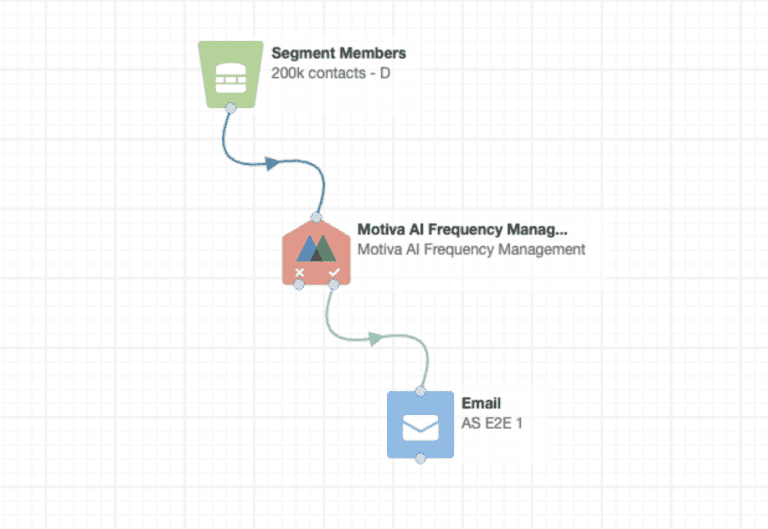
Place a Motiva FM step (Decision Service) before your email step on any canvas you want governed. FM:
- Evaluates each contact against your rule (e.g., “≤3 emails in 7 days”).
- Prioritizes when a contact is eligible for multiple sends using automated priority controls (e.g., “event invite outranks newsletter”).
- Reschedules & re-evaluates over your chosen window; over-cap contacts are held and re-checked automatically.
This turns frequency into a global control plane wherever FM is present—across products, regions, and teams—and gives you reporting that reveals the relationship between frequency, engagement, and unsubscribes so you can pick sensible cap limits by audience.
“Can we still use Eloqua STO?” — the straight answer
There are two STO paths, and they behave differently with frequency:
- Motiva Send Time AI (STAI) + FM (recommended)
- STAI optimizes per contact across a 3–7 day window, sending many small hourly batches.
- Motiva groups contacts into hourly micro-batches based on each person’s predicted best hour (focused on clean click signal).
- FM is built into the Motiva send step, so Motiva can check each micro-batch before it leaves and enforce the cap while still delivering at the contact’s best hour.
- Eloqua’s native STO
- Eloqua sends its own batches internally. Motiva and Eloqua’s own decision service steps cannot check those internal batches sent across multiple hours and days, so you cannot enforce send limits inside Eloqua STO sends. You can only check once before contacts hit the step, but not after contacts enter the step.
Bottom line: You cannot control frequency while using Eloqua STO. If you want guaranteed enforcement with optimized timing, use Motiva STAI + FM on those canvases.
How to Implement in a Complex, Multi-team Org
1) Establish your global floor (light touch).
Run Motiva’s Frequency Report to find where unsubscribes begin to spike as weekly email count rises, then set a conservative global cap (e.g., “≤7 per week”) to get everyone on-canvas without disruption.
2) Pilot a stricter cap on a real audience.
Pick a segment (e.g., EMEA customers). Add an FM step before every governed email with “≤3 per 7 days”. Track delivered, clicks-per-delivered, and unsubscribes for 2–4 sends.
3) For timing uplift, switch eligible canvases to Motiva STAI + FM.
You’ll enforce caps and hit best-hour delivery per person—without Monday floods.
Turn on priorities where teams overlap.
Define tiers (e.g., Revenue-driving > Targeted nurture > Awareness) so the right message wins scarce attention.
4) Turn on priorities where teams overlap.
Define tiers (e.g., Revenue-driving > Targeted nurture > Awareness) so the right message wins scarce attention.
5) Evolve to segment-specific caps.
Use reporting to tune cadence by audience (e.g., exec ABM can tolerate higher weekly volume; general database gets a lower cap).
Frequently Asked Enterprise Questions
“Will transactional programs be delayed?”
No—FM only governs where you put it. Keep operational flows FM-free.
“What if two canvases target the same contact with equal priority?”
FM chooses one; the other gets rescheduled and re-evaluated automatically within your window.
“How fast can we see impact?”
Once installed, you can use Send Time AI with Frequency Management immediately. From there, you can expect to see lower unsubscribes and higher engagement per delivered within a few cycles. Clients generally see a 25-50% uplift in unique click rates by using Motiva’s Send Time AI.
The Bottom Line
Global enterprises don’t suffer from a lack of emails—they suffer from a lack of coordination. Motiva Frequency Management gives you a simple, reliable control plane across teams, regions, and overlapping canvases: set a cap, define priorities, and let Motiva automatically reschedule over-cap contacts so the right message wins the slot. When you pair FM with Motiva Send Time AI, you keep those caps and deliver at each contact’s best hour—batch by batch, hour by hour—so staggered sends don’t break your policy.
If you want the deep dive, the Guide to Frequency Management walks through analysis, caps, priorities, and the learning loop, and the Frequency Management FAQ covers roll-out patterns and common objections.
