How to pick the right cadence, protect your reputation, and stop bleeding unsubscribes

It used to be the case that “more email = more results.” Cheap channel, easy volume, big numbers on the dashboard. Times changed. In a world of crowded inboxes and stricter regulation, blasting harder usually backfires—fatigue rises, unsubscribes climb, and inbox providers start pushing you to the sidelines. Frequency Management (FM) is about choosing how often to talk so contacts keep listening—and you keep delivering to inboxes, not spam folders.
Below are the questions we hear most about Frequency Management—and the practical patterns teams use inside Eloqua with Motiva to make it work.
“What is Frequency Management?"
Motiva Frequency Management gives you reporting and controls to analyze the relationship between send cadence, engagement, and unsubscribes—then automatically enforce per-audience send limits across your Eloqua campaigns. Think: “No more than X emails every Y days” with optional campaign priorities and automatic rescheduling for contacts who’ve already hit their limit.
What it’s not: a blunt global “off switch.” You decide where to place FM on the canvas, whether to use priorities, and which programs should (or shouldn’t) respect the limit.
“We care about closing deals. Why would we send fewer emails?”
Because sending more low-relevance email trains people—and inbox providers—to ignore you. Lower cadence on generic emails protects your sender reputation and preserves attention for the messages that actually move pipeline (webinars, product updates, bottom-funnel offers). Frequency caps reduce fatigue and unsubscribes, which in turn improves placement with inbox providers. Result: more engagement per delivered email.
“What’s the relationship between frequency and unsubscribes?”
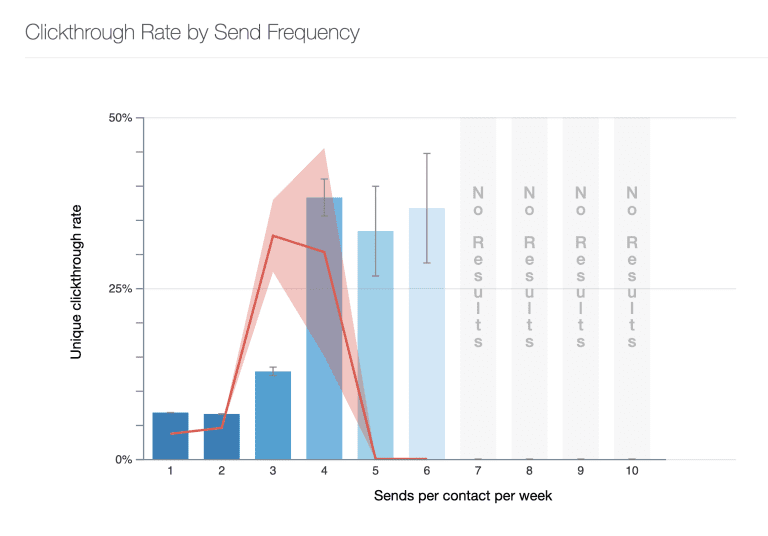
It’s unique to your audience. Motiva’s Frequency Report reveals how engagement and unsubscribes change as average weekly email count rises, so you can find the “sweet spot” where engagement stays high and unsubscribes stay low—globally and for specific segments. The blue bars in the char above show contacts who receive an average of 1, 2, 3, etc. emails per week and their click through rate. The red line is the unsubscribe rate. In this example, the unsubscribe rate soars as the average send frequency per week increases.
How to read it:
- Start global to see the big picture and then filter down to specific groups within your overall audience.
- Gather context (lead sources, acceptable unsub rates, nurture strategy) to guide strategy.
- Identify your first cap (e.g., 2/week vs 3/week) based on where unsubscribes start spiking and engagement dips.
“How do we test Frequency Management without risking quarterly results?”
Start small, prove it fast:
- Pick one audience (e.g., a small customer segment or region).
- Use the Frequency Report to pick a sensible limit (e.g., “No more than 3 emails every 7 days”).
- Add an FM step before each email targeting that audience (same rule everywhere).
- Measure delivered, opens/clicks per delivered, and unsubscribes over 2–4 sends.
- Compare against a small holdout that does not enforce the cap (only if your policies allow).
This gives stakeholders a clear, apples-to-apples view of impact using your own campaigns.
“How do we make sure high-priority emails go first?”
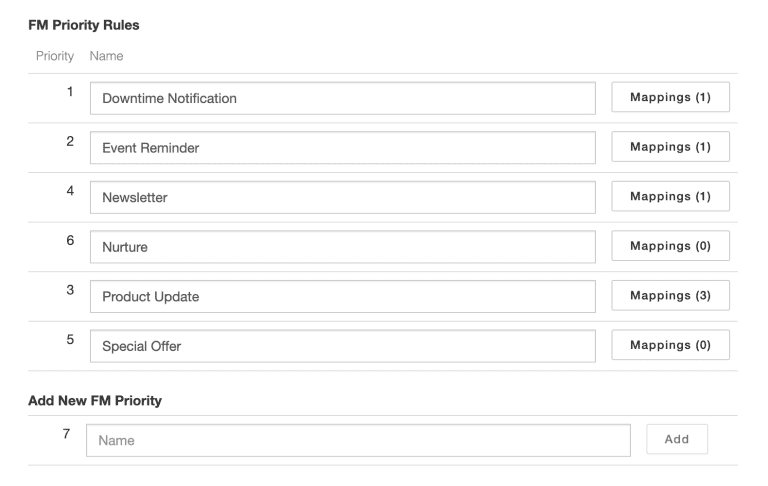
Enable FM with Priority. Assign each frequency step a priority level so, when a contact has one “send slot” available, the right message wins (e.g., webinar invite outranks an awareness newsletter). If a contact is at their cap, Motiva automatically reschedules and re-evaluates them according to your window.
Typical tiers:
- Revenue-driving (webinars, product updates, offers)
- Targeted nurture content (guides, videos, podcasts, white papers)
- Awareness / editorial (industry insights, blogs)
“We don’t want to delay transactional and trigger emails. Can FM be turned off?”
Yes. FM only governs contacts that flow through the FM step on your Eloqua canvas. Keep transactional/operational programs off that path, or place FM only where you want cadence control. FM is off by default until you turn it on and set limits.
“How does FM work with Send Time AI?”
Yes, with Motiva Send Time AI. They complement each other: FM ensures you don’t over-message; Send Time AI ensures the message arrives when that contact is most likely to engage. Use both to send fewer, smarter emails that land at the right moment without overshooting your cadence.
Motiva Frequency Management does not work with Eloqua’s native STO.
“What knobs do we actually control?”
- Frequency limits: e.g., “No more than 3 emails every 7 days,” with or without an end date.
- Priorities: which emails should be considered first when a slot is available.
- Rescheduling: automatically hold and re-evaluate contacts who’ve hit their cap.
The Big Opportunities Frequency Management Unlocks
1) Drive down unsubscribes (and regulatory risk)
When unsubscribes fall, you retain learned audience signals and reduce compliance headaches—vital in stricter regulatory environments (GDPR and similar). Protecting attention is now table stakes.
2) Improve inbox placement and reputation
Less hammering, more relevance. Smoother cadence plus lower unsubscribes and fatigue signal quality to inbox providers, helping more of your important emails reach the inbox.
3) Make room for what matters
By capping low-value sends, you free capacity for high-impact campaigns—and ensure those take priority when a contact has only one slot available.
4) Segment-specific cadence
Analyze frequency at the segment level (e.g., C-suite vs managers) and set different caps so each audience gets the cadence that fits their tolerance and value.
Practical Eloqua Playbooks You Can Copy
Baseline Frequency Cap (Global)
Where: Newsletter + nurtures
How: FM step before each email → Cap: X emails / 7 days → No priorities
Why: Quick win to reduce fatigue and unsubscribes without major refactors.
Priority-Aware Pipeline
Where: Shared audience across multiple teams
How: FM with Priority → Event invites and product updates outrank awareness → Cap: X/7 → Automatic rescheduling on over-cap contacts
Why: Ensures revenue-driving messages win scarce attention.
Segment-Specific Caps
Where: Exec ABM segment vs. general database
How: Use Frequency Report per segment → Execs X/7; general X/7 → Roll out on their respective canvases or architecture in the same canvas.
Why: Aligns cadence to tolerance and value by audience.
“Hands-Off” Transactional
Where: Order confirmations, password resets
How: Keep FM off those canvases
Why: Ensure zero delays for operational mail.
How to Roll Out FM Without Drama
- Baseline analysis: Run the Frequency Report (global), gather context (acceptable unsub rate, nurture strategy). Pick an initial limit. Be lax and choose a limit like no more than 7 emails per week. This will get everyone in the system without risk of losing them.
- Pilot: Apply a stricter limit to a small segment.
- Measure: Focus on opens/clicks per delivered and unsubscribes.
- Prioritize: If multiple teams share segments, turn on priorities.
- Expand & tailor: Use segment-level analysis to tune caps for high-value audiences.
Success definition:
- Lower unsubscribe rate for capped audiences
- Equal or higher engagement per delivered
- Healthier domain-level delivery indicators over time
The Bottom Line
Frequency Management may feel counterintuitive—fewer sends, better results. But once you see your own frequency curve and add a simple cap (with priorities where it counts), the picture is clear: you’re not shrinking reach—you’re reclaiming it for the messages that matter.
Want proof with your own programs?
We’ll run a quick Spot Check to show the ideal cadence for your audiences and where a cap will protect reputation and lift performance.
