
You can’t track performance improvement and the impact of your efforts without a baseline. Here’s two approaches for calculating a baseline on existing and new email marketing campaigns.
Historical Baseline
If you’re making improvements to an existing campaign, then calculating a baseline is fairly easy. Run a report within your marketing automation software to pull up the average unique open rate and average unique click through rate of your previous iterations of the campaign before you optimized the content.
Historical baselines are also referred to as a pre/post baseline because you’re comparing the performance pre-optimization to the performance post-optimization.

This type of baseline is usually more compelling to executives because it shows an actual performance improvement over time and leads to concrete results.
However, the downside to a historical baseline is that it’s not as statically accurate as other approaches because there are other variables, like time of year and changes in content, that could impact the performance of previous campaigns.
Test Baseline
If you’re launching a new campaign and you want to rely on actual engagement data to drive your content strategy, then you’ll need to set up a test baseline.
To calculate a test baseline you need to try out several different approaches within the same campaign and compare the performance of each approach.
Message Testing
This is fairly easy with message testing. Develop several email versions, one that’s traditional, or represents the status quo for your company, with other versions that are more experimental. Feed these email versions into Motiva’s automated multivariate Message Testing step.
Our Message Testing step will automatically conduct a series of tests to determine which version results in the highest engagement for your audience. You’ll also have a full report so you can analyze the results and know with a high degree of confidence which version truly is the best.
The more traditional email version in this case is your baseline. Answer the question of how the experimental versions performed compared to the traditional version and record this insight to guide your content strategy.
Send Time AI
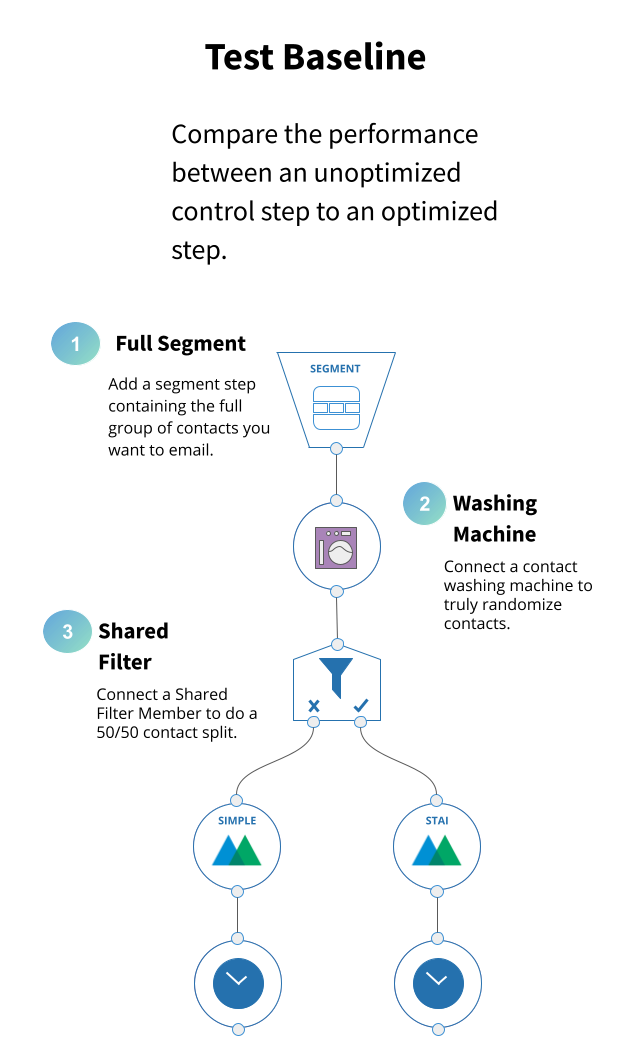
If you’re using a Send Time AI optimization on a new campaign and you want to compare the performance between Send Time AI and a single send batch and blast, then you’ll need to set up the test in your campaign canvas.
You can do this in Eloqua by using the following architecture and instructions below.
Randomize Contacts
Segment & Contact Washing Machine
- If possible, ask your IT, Data, or Marketing Ops team to add a blank contact feature to all contacts with the label “Random”
- In the Eloqua campaign canvas, drag an Eloqua Segment step onto the canvas and configure it to contain the entire audience you want to email.
- Add an Eloqua Contact Washing Machine step below the Segment step and connect the two.
- Double click the Washing Machine step and click the pencil icon to configure the step.
- Under “Step 1”, name the “Step Name” as “Randomizer”
- Click “Source” use the drop down menu to select the blank “Random” field you created for your contacts.
- Click the “Add Action” button and select “Math” from the menu of options.
- In the field under the label “Enter math expression” input the following expression: “rand(1,10)”
- Click “Destination” and select the same blank “Random” field you selected as the “Source”
- Click “Save” and return to the canvas.
Create a New Shared Filter
- Open another web browser tab and load your Eloqua account. Click the Audience Icon in Eloqua’s main navigation menu. It looks like a contact card.
- Go down to “Tools” and then select “Shared Filter” which will take you to your shared filters.
- Click “New” in the upper right hand corner and a new window will appear.
- At the top of the new window, you’ll see Untitled Shared Filter. Click this text to rename the new shared filter to “50/50 Split”
- On the right side you will see an option at the top of the list for “compare contact fields.” Drag that option into the blank space on the left side of the window.
- Click the “compare contact fields” bar that appears in the blank space.
- In the “select a field” dropdown, choose the blank “Random” contact feature you used as a Source and Destination for the Contact Washing Machine.
- In the dropdown just beneath, where is says “exactly,” click and choose “greater than” and enter “5” in the field just below.
- Click “Save”in the bottom left corner of the window.
- Go back to your Add an Eloqua Shared Filter Member decision step to the canvas and connect it to the Contact Washing Machine step.
Shared Filter Member Step
- Go back to the window with your campaign and add an Eloqua Shared Filter Member decision step to the canvas. Connect it to the Contact Washing Machine step.
- Double click the Shared Filter Member step and, in the dropdown in the window that appears, choose “50/50 Split”
- Keep the evaluation period to “0”
Simple Email
- Drag a Motiva Simple Email step onto the canvas under the Shared Filter Member step.
- Connect the X side of the Shared Filter Member step to the top of the Motiva Simple Email.
- Double click the Simple Email step and click the pencil icon to configure.
- Add the email asset you want to send to your audience from the dropdown.
- Choose when you want to send the email.
- Determine your frequency management settings if you’re using frequency management.
- Check your standard Eloqua Settings.
Send Time AI Email
- Drag a Motiva Send Time AI step onto the canvas under the Shared Filter Member step.
- Connect the check side of the Shared Filter Member step to the top of the Motiva Simple Email.
- Double click the Simple Email step and click the pencil icon to configure.
- Add the email asset you want to send to your audience from the dropdown, the same email you used with the simple email.
- Choose if you want to restrict the send window or not.
- Make sure frequency management is off.
- Check your standard Eloqua Settings.
- Activate the campaign when you’re ready.
Interpreting Results
Send Time AI takes 7 days to complete. It takes time for all the opens to trickle in so wait at least two days after Send Time AI is completed before comparing the simple email engagement to the Send Time AI engagement.
If you’re interested in learning more about optimizing your email campaigns, check out our post on identifying opportunities for optimization.
Want to see how Motiva works? Pick a time to see a demo!
