Practical answers and playbooks for dialing in targeting and content—fast.

Spray-and-pray content is out. If you want more qualified engagement, you need to see which slices of your audience actually respond—and speak in the style that moves them. Motiva’s Persona Reporting shows you how different groups behave. Persona Voice turns your own top-performing emails into style guidelines. And Motiva Generator uses those guidelines to instantly adapt drafts for each persona. Together, they make precise targeting and message versioning achievable in normal marketing time.
Below are the most common questions teams ask as they evaluate Persona Reporting, Persona Voice, and Generator—plus the concrete ways practitioners put them to work in Eloqua.
“What is Persona Reporting?”
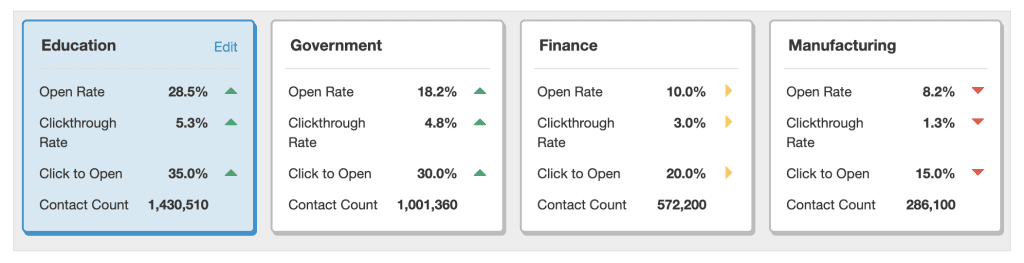
Persona Reporting lets you isolate specific groups (personas) and track how they engage over time so you can refine segmentation and content strategy. It’s designed to answer “who is responding?” and “to what?”—without manual spreadsheet gymnastics.
What it’s not: a one-off audience snapshot. Build persona cards from Eloqua segments and you get a living report that keeps pace with your data.
“And Persona Voice + Generator—how do those fit?”
Persona Voice automatically analyzes the top-performing emails for a group and produces concrete writing guidelines (tone, structure, themes) that have worked for that audience. Motiva Generator then uses those guidelines and your brand inputs to brainstorm or adapt drafts for that persona with a few clicks. Think of Persona Voice as the data-driven style guide and Generator as the co-writer that applies it.
“How does it work—end-to-end?”
- Create/refresh segments in Eloqua (industry, role/seniority, region, ABM account, engagement level, product interest, etc.).
- Add persona cards in Motiva linked to those segments; review Persona Reporting to see performance deltas by group.
- Run Persona Voice on any priority persona to extract high-performing patterns from your own content.
- Generate/adapt versions with Motiva Generator using those guidelines; ship multiple persona-specific variants in minutes, not days.
Bonus: Use Who Responded to discover top attributes worth turning into personas (great for “what should we slice next?”).
“How many personas can we make?”
As many as are useful for decision-making and execution. Most teams start with 4–8 high-impact slices (e.g., Role×Region, or ABM Tier×Lifecycle) and expand as they prove lift. Persona cards are quick to set up since they’re driven by Eloqua segments.
“Do personas stay fresh or go stale?”
They stay fresh if you base them on data-driven Eloqua segments (not static lists). Because the report keys off those segments, as contacts enter/exit, your persona views and metrics update automatically.
“We’re worried about complexity—how do we manage lots of versions?”
Use the canvas to split by contact filters for only the personas that matter, then keep the rest on a “default” path. Persona Voice + Generator drastically reduces the content burden by turning a single baseline email into targeted variants quickly—speeding legal review because each version follows an evidence-based guideline.
Pro tip: Pair each persona path with Send Time AI and Frequency Management to optimize when and how often each group hears from you. (These Motiva modules are plug-and-play with the same campaigns.)
“What should our first set of personas be?”
Common, high-leverage slices:
- ICP basics: Industry, company size, region.
- Buyer fit: Job role/function, seniority/decision level.
- Lifecycle & intent: MQL vs. SQL, product trial users, recent engagers vs. fatigued.
- ABM: Strategic accounts (Account Persona Reporting) to learn which angles work at that company.
If you lack profile data, use Dark Pool/engagement-based segments to start (e.g., “warming but fatigued”). Then refine as you enrich.
“How do we prove this works before we commit to a rollout?”
Adopt a “two-persona pilot”:
- Choose a high-volume program (newsletter, nurture, webinar invite).
- Stand up two persona cards (e.g., Director vs. Practitioner).
- Run Persona Voice on one persona and adapt the email with Generator; keep the other persona on the baseline.
- Compare engagement deltas in the Motiva Performance Report and downstream KPIs in Eloqua.
- Iterate (title/CTA and content angle) using Persona Voice.
Practical Eloqua Canvas Patterns You Can Copy
Pattern A — Persona-Targeted Invite (with timing & cadence intelligence)
- Entry: Master audience in segment
- Decision: Persona A/B (split the audience using a contact filter)
- Version A
- Motiva FM Step: Set the ideal frequency limit for the persona
- Motiva STAI Step: Send Time AI (per-contact timing) sending version A (Generator-adapted using Persona Voice)
- Version B
- Eloqua Email Step: Send version B (your baseline version) to the rest of the audience.
Why it works: You get persona-specific copy + optimal send time + safe cadence in one flow.
Pattern B — ABM Persona Drill-Down
- Segment: Tier-1 target accounts → Persona cards per account or per buying center
- Decision: Split audience by buying center or decision level
- Motiva STAI Step: Generator-adapted versions for each persona optimized with Send Time AI
Review: Performance Reporting filtered by Personas to see which angles land at each logo; feed wins back into sales plays.
“Can we audit what Persona Voice is recommending?”
Yes—guidelines are transparent and derived from your own top performers. Writers can read them directly; Generator uses them programmatically. That traceability builds trust with brand and legal.
Big Opportunities These Tools Unlock
1) Reveal underperforming groups—and fix them fast
Find personas that lag, extract what does work elsewhere, and adapt content with Generator to close the gap quickly.
2) Scale “brand-right” personalization
Use Brand and Persona Voice to standardize style across all your content development.
3) Supercharge ABM
Use Persona Reporting at the account level to learn which messages resonate at each logo and arm sellers with proven angles.
4) Continuous Learning Loop
Message-test variants, feed winning insights into Persona Voice, refresh guidelines, and let Generator propagate improvements across programs.
How to Roll It Out Without Drama
- Pick 1–2 programs and 2 personas.
- Create persona cards tied to Eloqua segments.
- Run Persona Voice, generate two adapted versions with Generator.
- Ship with Send Time AI + Frequency Management.
- Review Persona Reporting after two sends; keep what wins, prune what doesn’t.
Practical Playbooks You Can Copy
- Reactivation for “Fatigued Practitioners”
- Lower frequency path + Persona-matched value asset; adapt copy via Generator per guideline.
- Success = higher engagement per delivered and movement into healthy cadence.
- Executive Angle for “VP/Director”
- Generator-adapted version that emphasizes outcomes, brevity, and authority sources per Persona Voice guidance.
- Pair with Send Time AI to respect leadership-friendly windows.
- ABM One-Two Punch
Persona Reporting pinpoints which content themes worked at Account X; Generator adapts the next touch; sales follows with the winning angle.
The Bottom Line
Persona Reporting shows who to talk to and what’s landing. Persona Voice tells you how to talk to them. Generator makes it fast. Start small, prove lift on one program, then scale versions only where data says it’s worth it.
Want to see it on your own data?
We’re happy to run a quick Spot Check and outline an initial persona plan for your programs.
