Answers to your biggest, burning questions for Motiva’s Per Contact Send Time AI

For years, “blast at 10 a.m. Tuesday” was treated like a best practice. Big batches, one timestamp, one-size-fits-all.
Times have changed. Motiva Send Time AI (STAI) challenges that habit by scheduling each contact’s email for the hour they’re most likely to click—not just open—so you lift the actions that matter: registrations, opt-ins, purchases. The result: steadier conversions, happier mailbox providers, and less guesswork for your team.
Below are the questions we hear most about Send Time AI—and the practical ways teams put it to work in Eloqua.
“What is Send Time AI, really?”
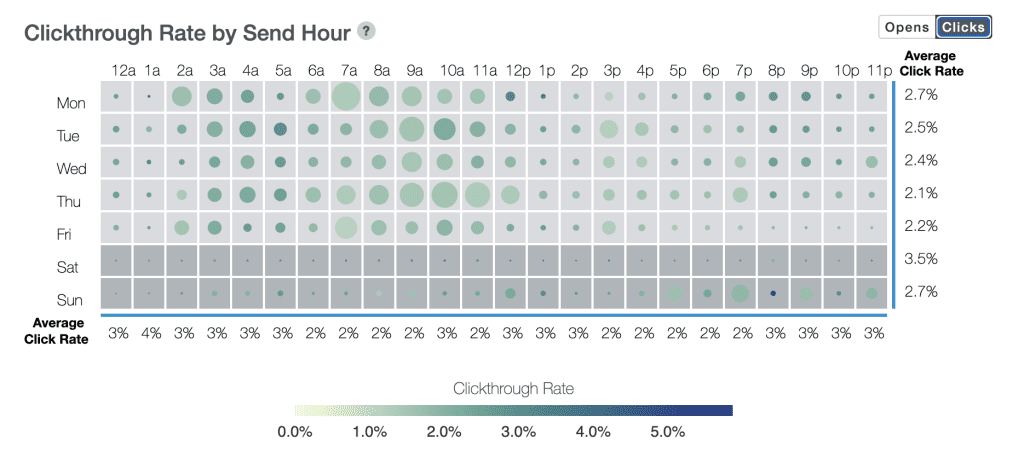
Motiva STAI is a machine-learning system that analyzes historical engagement for each contact and predicts the best hour (across a seven-day window) to send your email. It privileges click behavior when available, because clicks correlate more directly with downstream results than opens.
When an individual lacks enough history, STAI generalizes from look-alike patterns and continuously experiment to adapt to your contacts’ changing behavior and preferences.
What it’s not: a global “best hour” rule or a random spread. It’s individualized scheduling that gets smarter as your list behavior shifts.
“How does prioritizing clicks affect performance?”
Short answer: it focuses optimization where business happens.
Open-rate “wins” can be cheap; a high-intent click is the real signal. STAI optimizes for the unique click rate—and you’ll typically see steadier down-funnel performance as more contacts receive messages during their high-intent windows.
Reframe the KPI stack:
- Primary efficiency metric = unique click rate, not opens.
- Secondary = Down-funnel conversions (registrations, trials, purchases).
- Tertiary = Open rate (helpful, but not the goal).
“How do you build a model for every contact?”
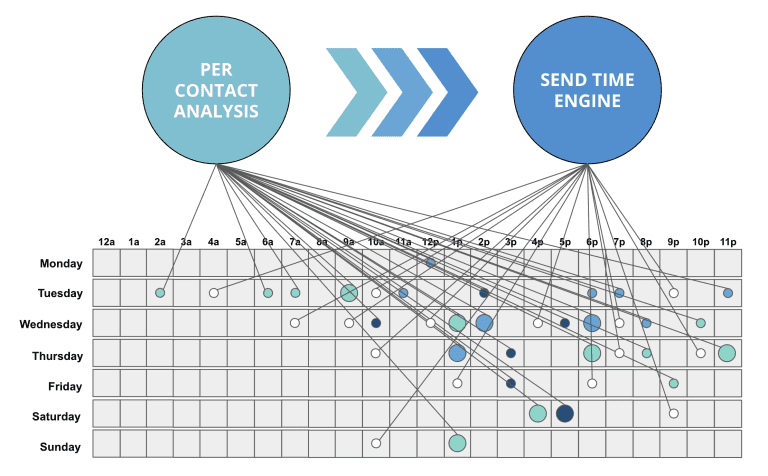
Motiva builds and updates a per-contact engagement profile using several years of opens and clicks across the entire Eloqua instance. Clicks carry more weight when present. For low-data or no-data contacts, STAI applies like modeling, mimicking the overall audience, and explores different hours as it’s rewarded with contact activity.
“What about the seven-day send window?”
Think of STAI as ideal for non-urgent and evergreen programs (newsletters, nurtures, product education, multi-week event promos).
For hard deadlines (e.g., “webinar starts Thursday at 11 a.m.”), use STAI for the lead-up series and switch to a fixed send for final reminders.
Planning tip: Map event promotion to multiple weeks so STAI can place each touch in the contact’s best hour while you still hit your calendar milestones.
You can also reduce the send window to as little as three days and still see a significant lift in click rates.
“What does STAI do with disengaged contacts who have little to no data?”
It generalizes from cohort patterns and runs controlled exploration to discover a better hour. As data accumulates, the model personalizes automatically.
“How often does STAI update?”
Models refresh on a weekly cadence using the prior week’s activity. That means your timing adapts continuously as buyer behavior shifts (seasonality, new job schedules, inbox algorithms, etc.).
“Will this delay my sends or create operational headaches?”
No—you’ll actually see smoother hourly volume. Instead of spiking your ESP at one timestamp, volume spreads across 24×7. That’s friendlier to Gmail/Outlook/Yahoo throttling and helps protect sender reputation—often lifting inbox placement for the people you most care about.
“How can I preview the impact before I change anything?”
Treat this like a what-if test using your own programs.
How to run a quick pilot:
- Pick one high-volume, non-urgent program (newsletter or nurture).
- Split traffic: Control = fixed time; Variant = STAI (7-day window).
- Run for 2–4 sends (enough for timing effects to show).
- Compare:
- Unique Click Rate (primary)
- Conversion rate on the key action (registration/opt-in/purchase)
- Spam complaints & deferrals (secondary deliverability health)
The Big Opportunities Send Time AI Unlocks
- Re-engage fatiguing contacts—on a per-contact basis
Pair STAI with targeted content for people showing signs of fatigue. Fewer “meh” opens at random times; more meaningful clicks at their best times. Use softer CTAs, preference updates, and high-value resources to rebuild momentum. - Lift down-funnel actions on business-critical programs
If registrations or purchases are the goal, optimizing for clicks at the right hour is the shortest path. Expect steadier conversions, especially on mid-funnel education and trial nudges. - Smooth hourly send volume to help deliverability Mailbox providers dislike spikes. STAI naturally spreads volume across the clock, reducing throttling/deferrals and protecting your sender reputation—especially on big sends.
How to Roll Out Send Time AI Without Drama
Start small, prove it fast
- Choose 1–2 non-urgent programs with consistent volume.
- Run the pilot design above (control vs. STAI) with a small holdout.
Set clear success criteria up front
- Unique Click Rate ↑
- Conversion rate on the program’s primary action ↑
- Complaint/deferral/bounce indicators ↔ or ↓
Keep it practical
- Use STAI for evergreen and nurture flows first.
- For hard deadlines, use STAI on the early touches, fixed send on the final reminder.
Communicate the why: “We’re sending at their best hour to earn more meaningful engagement, not just opens.”
Practical Playbooks You Can Copy
1) Multi-Week Event Promotion
Sequence:
- T-3 weeks: STAI (value-first asset: agenda highlights, speaker reel)
- T-2 weeks: STAI (social proof, customer story)
- T-1 week: STAI (clear CTA with incentive)
- T-1 day & T-0: Fixed send (final reminders)
Success: Registration rate ↑ without inbox fatigue; reminder emails remain concise. Check out our in-depth playbook for events.
3) Nurture Drip Re-activation
Segment: Inactive 90–180 days but still reachable.
Canvas: Segment → Motiva: Send Time AI → Low-friction content (1–2×/month) → Preference update CTA
Success: Return to activity without hammering inboxes; improved domain health.
4) Product Education / Trial Nurture
Canvas: Trial start → Motiva: Send Time AI → Tips/How-to series (3–5 touches)
Measure: Feature adoption events, trial-to-paid conversion.
Success: Higher activation from emails sent at moments users are more receptive.
(Tip: If you’re also using Motiva Dark Pool, run Smart Suppress upstream to protect reputation, then let STAI optimize timing for the reachable audience.)
The Bottom Line
Send Time AI often feels counterintuitive at first—don’t pick a time, let the model pick 168 possible hours. But once you compare clicks per delivered and downstream conversions—and see smoother hourly volume—the “why” becomes obvious: you’re sending smarter.
Want proof with your own data?
We can run a quick Spot Check of your Eloqua instance and use our Send Time Report to find new send time opportunities you’re leaving on the table.
