Answers to your biggest, burning questions for Dark Pool and Smart Suppress.

It used to be the case that sending more email was better, and there weren’t really side effects or even much cost in doing so. Bigger segments, bigger sends, bigger numbers on the dashboard.
Times have changed. Motiva Dark Pool directly questions that assumption because bigger send volumes usually result in lower open and click rates, deliverability problems, and reputational harm. It’s about not knocking on doors that will never open so your best, reachable HUMAN contacts actually get your message…in their inbox, at the right time, with your sender reputation intact.
Below are some of the questions we hear from clients about Dark Pool along with the practical ways teams put it to work inside Eloqua and Marketo.
What is Dark Pool, really?
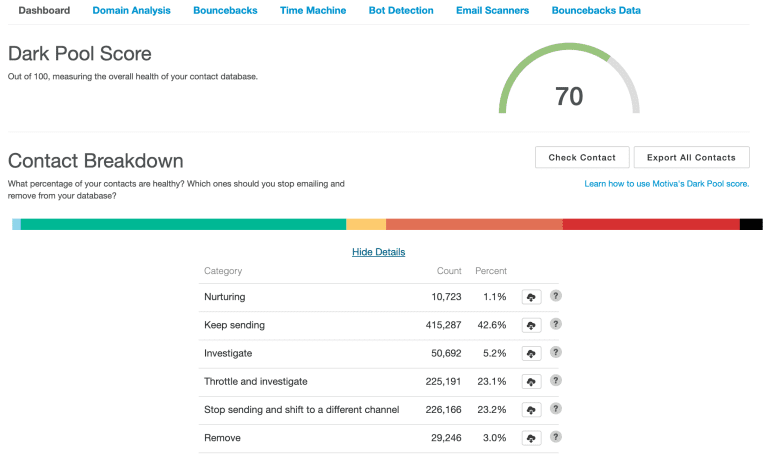
Motiva Dark Pool is an advanced AI system that uses behavioral data to understand how contacts and destination email domains engage with your email. It classifies your contacts into six distinct behavioral groups based on engagement, trending over time, and reachability. Motiva analyzes your contacts using a wide variety of signal data including opens, clicks, web views and form submits as well as bounceback messages. You can then use these categories with Smart Suppress inside your campaigns to surgically divide your active, reachable contacts from the inactive and unreachable contacts to improve your bounce rate and sender reputation with Email Service Providers.
What it’s not: a blunt “do not mail” switch. It’s a reachability and fatigue intelligence layer that helps you send smarter.
“Are you going to shrink my list?”
Short answer: Yes—by removing the ghosts, bots, and other problematic contacts. That’s the point.
Marketers love big top-line counts. But big lists often mask a hidden tax: spam filter friction, deferrals, higher bounce rates, greybots, and diluted or fake engagement that drags down inbox placement for the contacts who do want to hear from you.
Reframe the KPI:
- Primary audience size = Reachable + Human, not everyone with an email field.
- Primary goal = maximize inbox placement and real engagement per delivered, not total sends.
What you’ll notice after implementation:
- Fewer sends, less hourly volume spikes.
- Much better domain-level health with B2B destination domains and better results with ESPs like Gmail, Outlook and Yahoo.
- More opens/clicks per delivered, and typically steadier conversions because more of the right people actually see your campaign.
“Will conversions drop if we email fewer people?”
They shouldn’t—and you have safety nets.
Use Smart Suppress to protect reputation, then add a guardrail for the edge cases you’re worried about:
Sample Eloqua Canvas Pattern (post–Smart Suppress):
- Motiva: Smart Suppress (Dark Pool)
- Decision Step: “Recent High-Intent Activity?”
- Example rules to override suppression and re-include a contact:
- Engaged in the last 30 days (open/click/site visit/form submit).
- Yes → Route back to the email step (include them).
- No → Follow normal suppression (protect reputation).
- Example rules to override suppression and re-include a contact:
This pattern lets you keep your hot or warming leads in the flow – even if they have problematic bounceback messages in their record – and it keeps the chronic non-responders and problematic contacts out.
“How can I preview the impact before I change anything?”
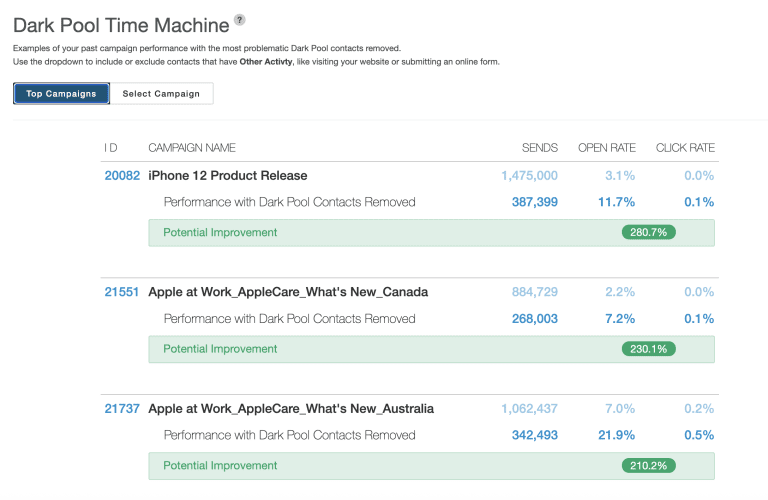
Use Time Machine like a what-if simulator.
How to run it:
- Pick one or two recent, high-volume campaigns for a specific audience.
- In Time Machine, simulate: “What if we had suppressed [Stop Sending/ Remove/ Throttle & Investigate]?”
- Compare side-by-side KPIs: delivered, opens, click, and their rates.
- Pay special attention to engagement per delivered (not just totals).
This gives your stakeholders the sneak peek they want—using your own data over past campaigns
“Can we audit who got suppressed and why?”
Yes. Export and inspect contacts by Dark Pool category to build trust and tune your playbooks.
For each problematic category (Throttle & Investigate, Stop Sending and Remove), review:
- Contact ID – No personal identifying information
- Dark Pool Category
- Contact creation date – how long they’ve been in your system.
- Email domain
- Catch all status
- Other activity – including web views and form submits
- Misclassified softbounces which should be hardbounces
- Counts for sends, opens, clicks, and form submits
- Detailed rationale for Dark Pool classification
How to use the audit:
- Stop Sending: design a highly targeted re-engagement (see below).
- Remove: verify data hygiene; consider separate cleanup workflows.
- Throttle & Investigate: keep them in the mix but at a reduced cadence (fewer waves, better timing).
The Big Opportunities Dark Pool Unlocks
1) Re-engage fatiguing contacts—surgically
Don’t throw generic “We miss you” emails at everyone. Segment by Dark Pool category and gather insights on your fatigued contacts based on past behavior:
- Content-match reactivation: Use Motiva Personas and Persona Voice to adapt email versions to be more engaging for these contacts.
- Low-friction asks: 1-click preference update, softer CTAs, higher value resources and special offers.
- Channel shift: If email reachability is weak, trigger social and ad audiences or sales nudges instead.
2) Dramatically improve bouncebacks & sender reputation
When you stop hammering unreachable addresses, bounce rates come down. That reduction is a direct signal to Email Sender providers that you’re a reputable sender. Reputation goes up; inbox placement improves; your engaged audience gets more of your mail.
3) Smooth hourly send volume to please Gmail/Outlook
Large spikes look risky to many ESPs. Dark Pool reduces raw volume and helps you pace sends more evenly. That smoother hourly profile is friendlier to inbox providers and helps prevent throttling and deferrals—especially on big launches.
How to Roll Out Dark Pool Without Drama
Start small, prove it fast.
- Pick 2–3 high-volume programs (newsletters, nurtures, webinars).
- Run Time Machine to set a baseline “what-if”.
- Turn on Smart Suppress with the Eloqua Decision guardrail above.
- Create a small holdout (no suppression) to a duplicate email step for one or two sends to see the impact in real time.
Define success up front:
- Deliverability: bounces.
- Engagement efficiency: opens/clicks per delivered up.
Communicate the why: “Dark Pool isn’t about sending less—it’s about sending right so more of our reachable audience actually see the email and protecting our sender and brand reputation.”
Practical Playbooks You Can Copy
Reactivation (for Throttle & Investigate):
- Segment: contacts marked “Throttle & Investigate” with last engagement 6-12 months.
- Move to a separate canvas that uses:
- Ultra-low frequency (1–2 emails/month).
- Narrow, behavior-matched content.
- Alternate channel prompt (follow on LinkedIn, short video, preference update).
- Success = moved to Investigate or Keep and improved inbox placement signals.
Cadence Tuning (for Slow Down):
- Using Motiva Frequency Management, keep fatigued contacts in core programs but set a higher frequency limit for these contacts, especially on top-funnel awareness campaigns (e.g., every other newsletter).
- Reducing the overall number of emails sent to fatigued and unresponsive contacts will improve sender reputation and performance on bottom funnel campaigns.
Domain Repair:
- Use exports to isolate problematic domains.
- Temporarily reduce volume & frequency to those domains.
- Prioritize your strongest engagement content for those domains for 3 months.
The Bottom Line
Dark Pool feels counterintuitive at first—smaller sends, better results. But once you see your own data in Time Machine, add a simple Eloqua decision guardrail to protect hot leads, and review the exported evidence on who’s being suppressed and why, the picture gets clear: you’re not losing reach; you’re reclaiming it.
Want proof with your own programs?
We’ll run a quick Spot Check of your Eloqua instance or walk you through a Time Machine preview so you can see exactly where Dark Pool will protect your reputation and lift performance.
