A lot of detail gets lost in a simple statistic like the bounce rate. So you know how many emails bounced, but why and what kind of bounces? And what can you do to decrease the bounce rate?
Eloqua gives you the basic descriptive statistics you need to know there’s a problem. Motiva Dark Pool takes it a few steps deeper so you can solve the problem, improve your domain reputation and pave the way to higher engagement.
Domain Analysis
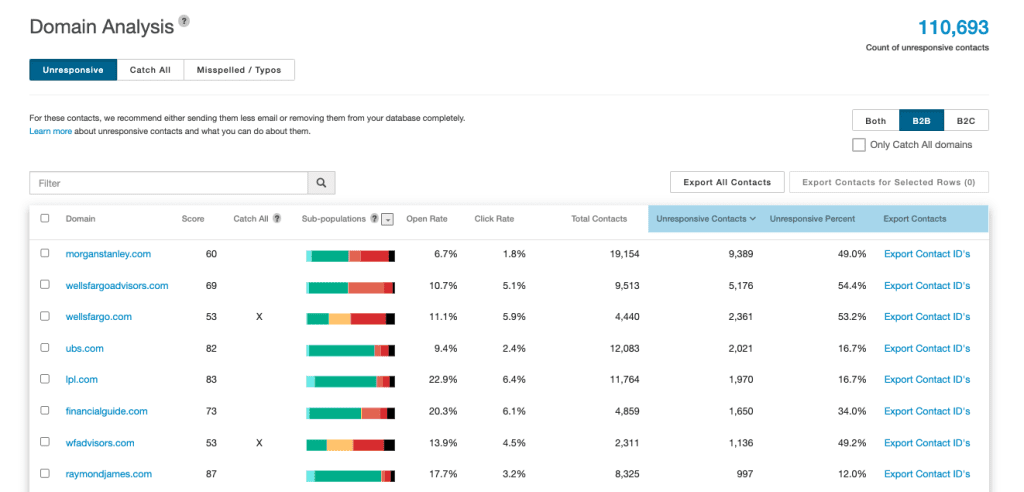
The Dark Pool Domain report was built just for this purpose. You can see the health of your communication with the contacts at every domain you email.
- Filter out the major consumer Email Service Providers like Gmail and Yahoo to focus on your primary customers.
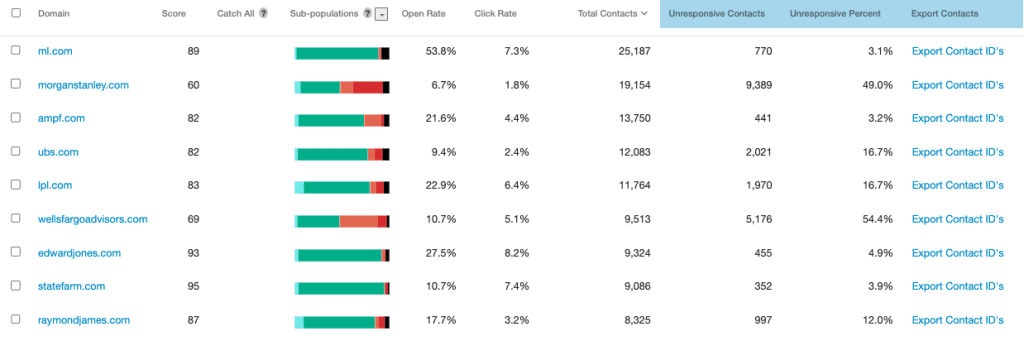
- Sort the table to identify the domains with the most contacts and quickly evaluate the health of your communication with key metrics.
- You can also filter to see only Catch All domains that will accept any email you send to them, even if it isn’t a real email address.
Bounceback Analysis
For those domains with a lot of unresponsive contacts, look at the bouncebacks on record for that domain to determine why those contacts are unreachable. For example, for the domain below, many of the contacts have a “No Recipient” bounce on record, which means those email addresses are invalid because the contacts simply aren’t at the company anymore. You’ll never reach these contacts so stop emailing them to improve your deliverability and engagement rates.
There can also be technical reasons why contacts aren’t responding that could be related to the domain administrator’s security settings. If it’s a valuable account with a lot of contacts, reach out to their IT department to ensure your email is getting through their fire walls.

You can export these contacts and have them flagged in Eloqua, whether that’s updating a contact attribute or CDO to suppress the contacts in segments or to have them marked as a hard bounceback so they’re never emailed again.
Dark Pool Smart Suppress Step
Motiva also automatically groups your contacts into 6 different categories based on the opens, clicks, web views, form submits and bounceback messages we have on record for all your contacts. The contacts in the top 3 categories (Nurture, Keep Sending, and Investigate) are relatively healthy. The contacts in the bottom three categories (Throttle and Investigate, Stop Sending and Remove) are contacts that are seriously fatigued and unreachable.

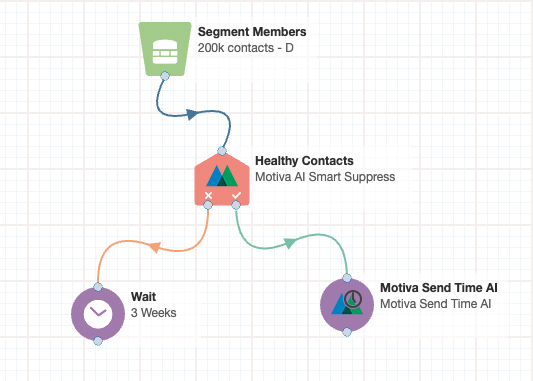
Contacts with problematic bounceback messages like “No Recipient” will be flagged in the Remove category and you can use the Motiva Smart Suppress step on the Eloqua Campaign Canvas to quickly filter those contacts out of any email send on the multi-step canvas.